在cocos2d-x的游戏开发中,避免不了本地消息通知,比如游戏活动提醒,游戏节日提醒等等,目的就是为了让玩家想起来这个游戏,继续玩这个游戏,所以这个也是很常用的一个东西。
IOS本地消息通知
ios的消息通知就是调用ios中的UILocalNotification这个类,要么是直接使用这个类,要么就是自己封装一个方法,然后调用这个类的方法。在cocos2d-x中可以自己封装一个这样的方法在.mm文件中,方便在程序中的调用。
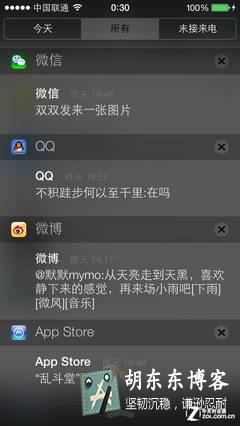
比如下面的这个:
#include "NoticeModule.h"
#import "AppDelegate.h"
void NoticeModule::addNotice()
{
    NSLog(@"addNotice");
    [[UIApplication sharedApplication] cancelAllLocalNotifications];//先取消所有通知

    UILocalNotification *notification=[[UILocalNotification alloc]init];
    if (notification)//
    {
        NSDate *date=[[NSDate alloc]init];
        notification.fireDate=[date dateByAddingTimeInterval:10];//设置提醒的重复间隔
        [notification setTimeZone:[NSTimeZone defaultTimeZone]];//设置时区
        [notification setRepeatInterval:NSCalendarUnitSecond];//设置提醒的重复单位,比如秒
        //如果为了定时,就是特定的时间的话,可以使用这个
       /*
       NSDateFormatter *forma=[[NSDateFormatter alloc]init];
       [forma setDateFormat:@"HH:mm"];
       notification.fireDate=[forma dateFromString:@"15:00"];//15点提醒
       [notification setRepeatInterval:NSCalendarUnitDay];//每天15点
      */
        //[notification setAlertTitle:@"提醒标题"];//ios8.0之后可以使用,提醒标题
        [notification setAlertBody:@"提醒内容"];//提醒内容
        [notification setAlertAction:@"提醒按钮"];//
        [notification setApplicationIconBadgeNumber:1];//设置提醒的软件右上角的小红点
        [notification setSoundName:UILocalNotificationDefaultSoundName];//默认声音
        //下面这行代码ios8.0之后必须要设置,用来注册通知,不然会出现权限错误。
       // [[UIApplication sharedApplication] registerUserNotificationSettings:[UIUserNotificationSettings settingsForTypes:UIUserNotificationTypeAlert|UIUserNotificationTypeSound|UIUserNotificationTypeBadge categories:nil]];
        [[UIApplication sharedApplication] scheduleLocalNotification:notification];
    }
}
其中fireDate、timeZone、repeatInterval和repeatCalendar是用于 UILocalNotification的调度。fireDate是UILocalNotification的激发的确切时间。timeZone是 UILocalNotification激发时间是否根据时区改变而改变,如果设置为nil的话,那么UILocalNotification将在一段时候后被激发,而不是某一个确切时间被激发。repeatInterval是UILocalNotification被重复激发之间的时间差,不过时间差是完全根据日历单位(NSCalendarUnit)的,例如每周激发的单位,NSWeekCalendarUnit,如果不设置的话,将不会重复激发。 repeatCalendar是UILocalNotification重复激发所使用的日历单位需要参考的日历,如果不设置的话,系统默认的日历将被作为参考日历。点击之后会自动进入应用
这个就是一个简单的提醒,然后在游戏中可以改写为其他形式,改变这个提醒的值,当然你这个是点击之后就没了,如果想要添加点击后的动作,可以这么做,在appdelegate里面,这个函数就是点击通知后的回调,userInfo是在定义通知的时候自己定义的,是一个属性,这个可以百度下去:
-(void)application:(UIApplication *)application didReceiveLocalNotification:(UILocalNotification *)notification{
    NSLog(@"Application did receive local notifications");

    // 取消某个特定的本地通知
    for (UILocalNotification *noti in [[UIApplication sharedApplication] scheduledLocalNotifications]) {
        NSString *notiID = noti.userInfo[kLocalNotificationID];
        NSString *receiveNotiID = notification.userInfo[kLocalNotificationID];
        if ([notiID isEqualToString:receiveNotiID]) {
            [[UIApplication sharedApplication] cancelLocalNotification:notification];
            return;
        }
    }

    UIAlertView *alert = [[UIAlertView alloc] initWithTitle:@"Hello" message:@"welcome" delegate:nil cancelButtonTitle:@"OK" otherButtonTitles:nil, nil nil];
    [alert show];
}
这样就是可以实现点击提醒的回调,这个就是好多游戏弹出一个提醒,你点击后进入了游戏。cocos2d可以调用这个进入游戏
(AppDelegate*)cocos2d::CCApplication::sharedApplication())->applicationWillEnterForegroundFromPushReward()
//在iOS8系统开发使用本地通知时,会出现如下的相关提示语:
//1 Attempting to schedule a local notification
//2 with an alert but haven't received permission from the user to display alerts
//3 with a sound but haven't received permission from the user to play sounds
//原因在于在iOS8系统上需要注册本地通知,这样才能正常使用
// iOS8注册本地通知
       [[UIApplication sharedApplication] registerUserNotificationSettings:[UIUserNotificationSettings settingsForTypes:UIUserNotificationTypeAlert|UIUserNotificationTypeBadge|UIUserNotificationTypeSound categories:nil]];
Android本地提醒
安卓的提醒和Ios的差不多,也是自己在JAVA代码里面写一个方法,可以直接弹出提醒,就想这样,在java类里面写一个函数:
 public void addNotice(String title,String content) {
    	System.out.print("sssssssssss");
		NotificationManager noticeMana=(NotificationManager)getSystemService(Context.NOTIFICATION_SERVICE);
		Notification notice=new Notification(R.drawable.icon, "通知", System.currentTimeMillis());
		Intent intent=new Intent(this, Cocos2dxActivity.class);
		PendingIntent pend=PendingIntent.getActivity(this, 0, intent, 0);
		notice.setLatestEventInfo(this, title, content, pend);
		noticeMana.notify(1, notice);
	}
然后在需要的后调用这个函数,就可以了。这样就会在安卓的通知栏弹出提醒了。
SDK实现通知
当然如果不想自己写,还有专门用来通知的sdk可以选用,百度下就有了,使用sdk也是一种选择。
小结:
这两个都是各自调用的自己的方法,只是用来各自调用,当然还会有另外一种情况,就是c和java混用数据,比如数据是在c代码,而现在想用java调用以作为安卓机的提醒,这里就需要用到JNI了,这个在第二个里面说。
版权属于:东哥笔记 - DongGe.org
本文链接:https://blog.dongge.org/212.html
本文采用知识共享署名4.0 国际许可协议进行许可。转载或大段使用必须添加本文链接,否则您将构成侵权!